REVIEW · SEOUL
South Korea: Unlimited Data and Voice eSIM
Book on GetYourGuide →Operated by LINK KOREA · Bookable on GetYourGuide
Instant data for South Korea.
This unlimited 4G LTE eSIM is built for one simple goal: get online fast without buying a local SIM on the spot. You scan the right QR code, connect after you land, and you’re set for navigation, translation, messaging, and all the things you rely on daily while traveling.
I especially like the instant data setup on SK Telecom and the fact that voice & SMS can be turned on later with a passport-based online verification. The one drawback to plan around: your phone must support eSIM (and your passport has to meet the eligibility rules), because voice features won’t work until verification is done.
In This Review
- Key points before you buy
- What you’re really getting: an eSIM that starts with data
- Speed, network, and hotspot: what it means day to day
- Activation timeline in Korea: email QR, then connect after landing
- Turning on voice and SMS: the passport verification step
- Price and value: why $7 can make sense
- Troubleshooting fast: QR code invalid and missing eSIM
- What to bring and check before you leave
- Who this eSIM suits best (and who should think twice)
- Should you book this unlimited South Korea eSIM plan?
- FAQ
- FAQ
- Is the data plan unlimited in South Korea?
- What network does the eSIM use?
- Do I get voice calls and SMS with the eSIM?
- Are outgoing calls and outgoing SMS included?
- When does the eSIM start working?
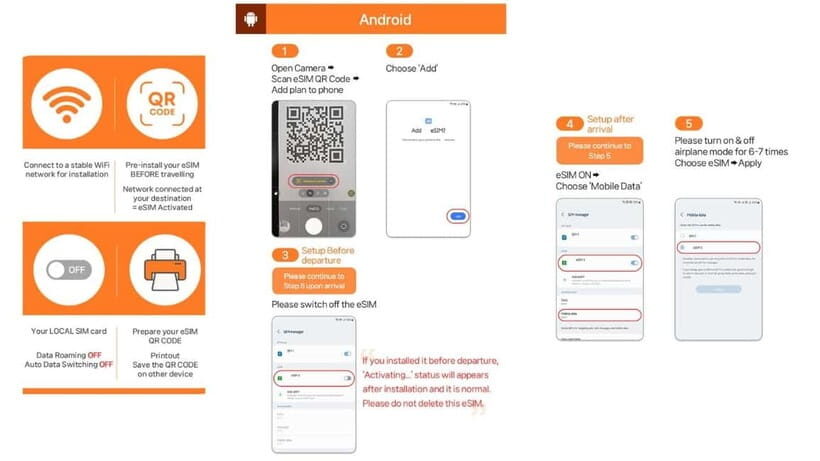
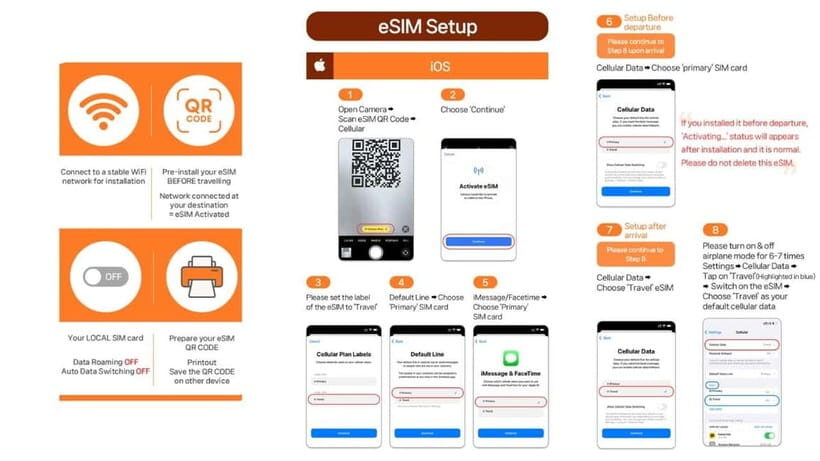
- How do I activate it in practice?
- What if I get a QR code invalid error?
- Can I use the eSIM for hotspot sharing?
- Who is eligible to purchase this eSIM?
- How long can I use it?
Key points before you buy
- Unlimited 4G LTE data, no speed throttling (stay online for maps, transit, and backups)
- SK Telecom network for a stable, locally supported connection
- QR code delivered separately by email (the voucher QR isn’t the eSIM QR)
- Voice calls and SMS after verification using the SK Roaming passport system
- Hotspot sharing supported when you want to connect another device
- Validity from 2 to 90 days so you can match most trip lengths
What you’re really getting: an eSIM that starts with data
This is a South Korea eSIM product tied to SK Telecom. At the core, it’s an unlimited 4G LTE data plan. That’s the part you can use right away once the eSIM is installed and your phone connects in Korea.
Voice and SMS are a second layer. They require an online verification step, and you’ll get a Korean phone number (010) after verification. Until you complete that, the eSIM is still usable for data—but call and text features won’t be active yet. The idea is smart for travelers: you can get online immediately for check-ins, tickets, and directions, then handle voice later if you need it.
Validity is wide, from 2 up to 90 days, with activation tied to when you connect to the SKT network (the system uses an hour-based schedule). So it’s not just a “set and forget” plan; it’s more like a timed starter you activate when you arrive.
You can also read our reviews of more tours and experiences in Seoul.



Speed, network, and hotspot: what it means day to day
The plan promises unlimited data without speed throttling on 4G LTE, using SK Telecom’s network. In practical terms, this is what you want if:
- you’re streaming music or video while riding buses/subways,
- you’re using maps constantly,
- you need reliable uploads (tickets, photos, online forms).
Hotspot sharing is supported, which matters if you bring a tablet, a laptop, or a second phone. Just keep in mind that hotspot can increase battery drain, so it’s best used when you truly need it.
Also, there’s no mention of “fair use” limits in the provided details. The product specs are straightforward: unlimited data, no speed throttling. Still, your real-world speeds will always depend on your phone, local coverage, and how crowded the area is—just like any carrier plan.
Activation timeline in Korea: email QR, then connect after landing
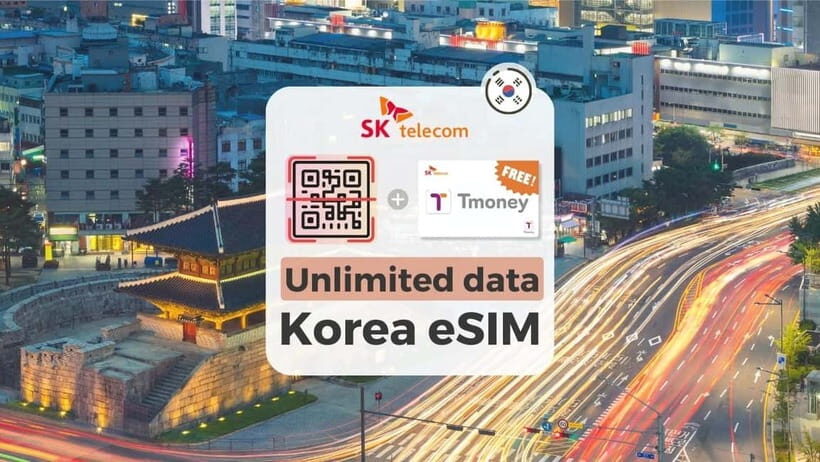
Here’s the part that can make or break a smooth arrival.
First, timing and QR codes:
- The QR code shown on your GetYourGuide voucher is not the eSIM QR code.
- You receive the real eSIM QR code separately by email, typically 1 day before your activity date.
Second, install-and-activate rules:
- The eSIM connects to the local network after you’ve arrived in Korea.
- Activation is tied to hours. The example given for a 3-day plan shows it starts at 22:00 on the first day and ends at 22:00 on the last day. So if you’re picking a plan length, don’t treat the dates like a strict “midnight-to-midnight” system. Plan your installation and your first connection window with that in mind.
Third, where you’ll use it:
- The product starts as soon as your phone connects to SKT’s network. That means you’re not waiting for a kiosk to open or a counter to handle your case—assuming the eSIM install is ready.
If you run into issues, your safety net is support from LINK KOREA (email [email protected] and WhatsApp link provided on the listing). In one case, support helped resend a missing QR email until it arrived right when someone landed.
Turning on voice and SMS: the passport verification step
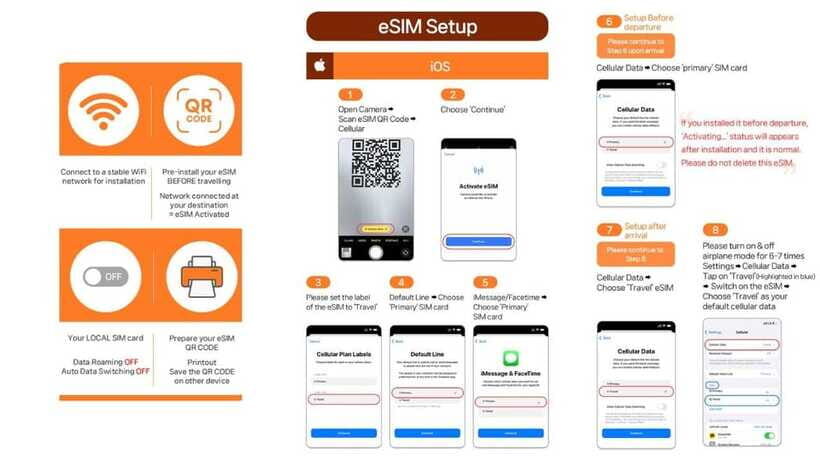
If you only care about data, you can treat voice and SMS as optional. But if you want a local number for texts or incoming calls, you’ll need to go through SK Roaming’s passport verification.
Key details you should know before you land:
- Voice & SMS activation happens after online verification.
- The verification system is available 08:00–22:00 every day.
- Verification can only be performed 1 hour after entry (so don’t try immediately at the airport the minute you walk off the plane).
- You can register only one phone number per passport.
- The eSIM can be used for data services only before validation.
What you’ll need:
- Your passport details for the User ID (Passport) verification system (website provided: www.skroaming.com/passport).
- During verification, you may be asked for a rental contract number plus the eSIM phone number. The instructions say these numbers are found in the contract given upon collection or in the voucher/eSIM details.
After verification:
- You’ll get a 010 phone number and voice/text services for incoming calls and texts.
- The call function may require online recharge after activation (charging website: https://skroaming.com/reservation/charging).
- The plan includes complimentary 2,640 KRW voice credits, about 10 minutes of domestic calls in Korea.
One more limitation worth highlighting: outgoing calls and outgoing SMS are not included. So if your plan is to make lots of calls home or text a lot internationally, this isn’t set up for that. It’s designed more for staying reachable inside Korea.
Price and value: why $7 can make sense
At $7 per person, the value comes from the “avoid hassle” factor.
Instead of:
- hunting for a data SIM when you arrive,
- paying more for a short-term setup,
- dealing with rental Wi‑Fi devices (extra battery, return logistics, and pickup queues),
you’re buying a plan that can start online as soon as you connect in Korea. That matters most for short trips, but it also helps for longer ones because you’re not constantly re-planning your connectivity.
For voice, the value depends on what you actually need:
- You get incoming calls and texts without extra charges, and you can activate voice/SMS with verification.
- If you just want data, you’re still getting the unlimited 4G LTE core benefit.
Where I’d be cautious on value is if your phone isn’t eSIM-ready. The product is clear: eSIM compatibility is required, and the eSIM can’t be refunded once issued. If you’re unsure, check it before purchase.






Troubleshooting fast: QR code invalid and missing eSIM
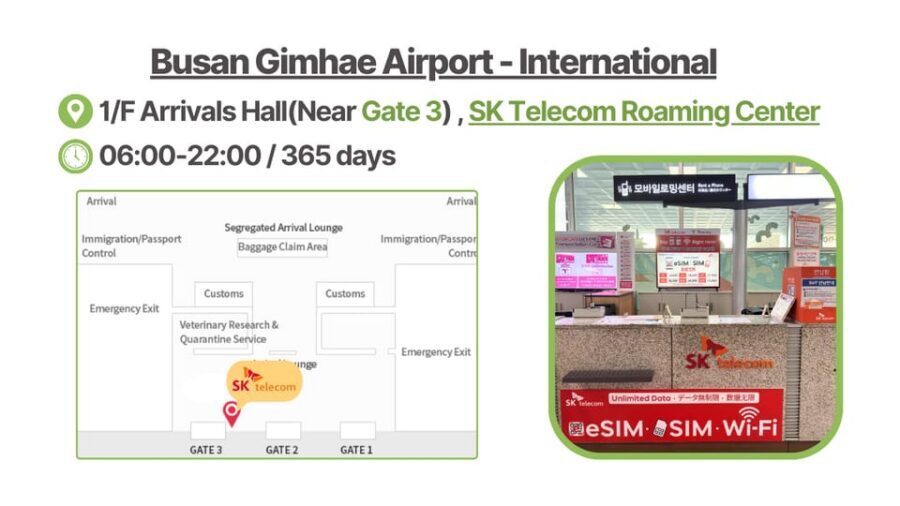
eSIM problems usually fall into two buckets: the wrong QR code, or the phone not showing the eSIM profile.
The wrong QR code issue:
- Remember, the voucher QR is not the eSIM QR.
- Your eSIM QR is emailed separately about 1 day before.
If you see errors like QR code is invalid:
- On iPhone: go to Settings > Cellular (you may need to look for the eSIM section).
- On Android: go to Settings > Connections > SIM Manager and check whether a new eSIM appears.
If the eSIM doesn’t show up or it won’t activate:
- Contact LINK KOREA by email or WhatsApp. The provided details make it clear you should reach out rather than keep retrying endlessly.
In a real-world example, an email delivery problem was handled by support, with communication that was fast and resulted in a resend until the QR arrived in time.
What to bring and check before you leave
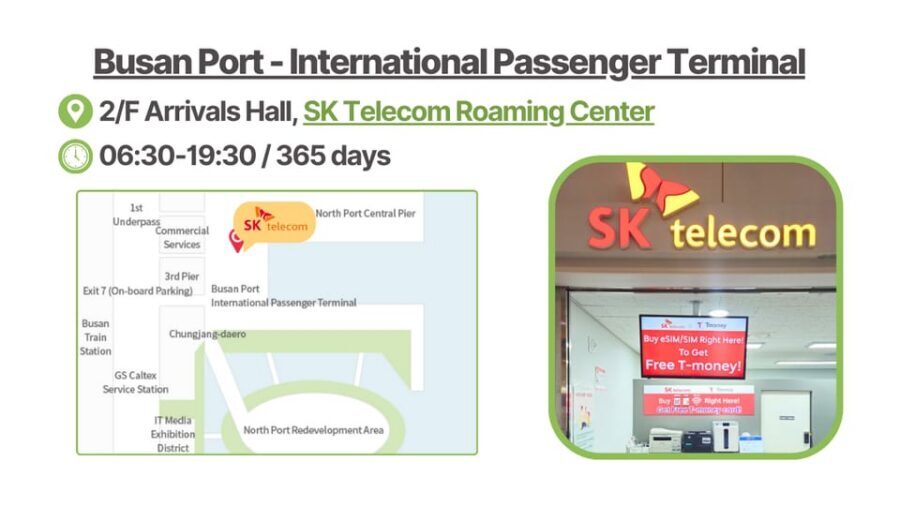
This is one of those products where preparation pays off quickly.
Bring:
- Your passport (required for eligibility and verification).
Check your phone:
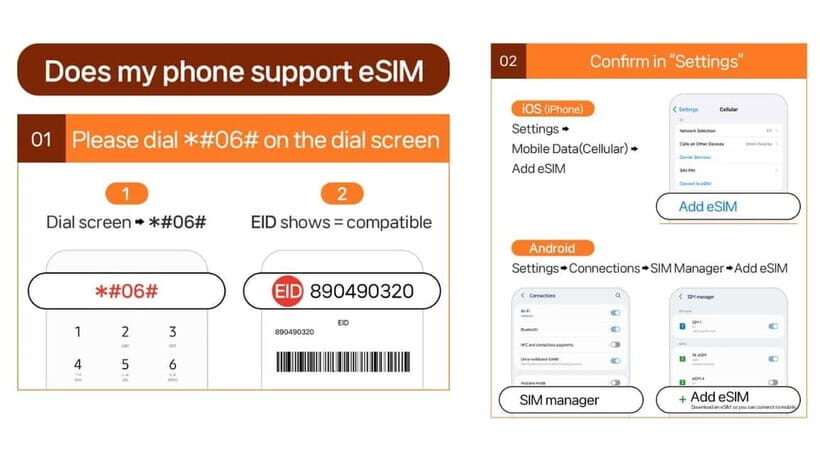
- Confirm eSIM support. The instructions say you can dial *#06# and check whether an EID shows. If there’s no EID, the device is incompatible.
- Make sure your phone is SIM-free / not locked for foreign SIM cards. The note calls out phones from the US, Canada, Japan, or the Philippines specifically, so if that’s you, double-check with your mobile provider before buying.
Check eligibility:
- Only foreigners with an overseas passport can buy.
- Korean passport holders are unable to purchase.
- The eSIM cannot be refunded once issued, so don’t wait until you’re already stressed at the airport.
Also, voice/SMS limitations:
- If you stay 91 days or longer, you might hit service limits or face suspension without notice, and refunds won’t be provided for that situation. If your trip might stretch past 90 days, plan for a different approach.
Who this eSIM suits best (and who should think twice)
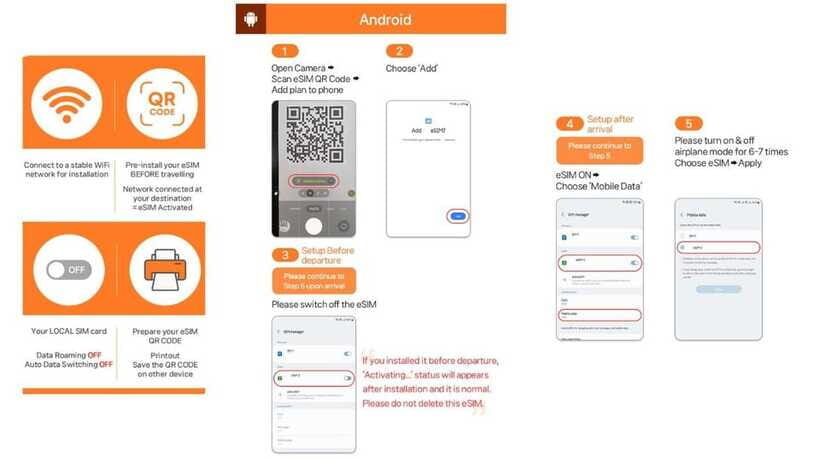
This plan fits best if you want:
- unlimited 4G LTE data for navigation and communication apps,
- a connection that works immediately after landing (once installed),
- optional voice/SMS for incoming calls and texts via a Korean number.
It may not be the best fit if:
- your phone doesn’t support eSIM, or you’re not confident about checking EID,
- you need lots of outgoing calling or outgoing SMS (those aren’t included),
- you might stay beyond 90 days, because tourist-period verification rules can limit service.
If you’re the kind of traveler who likes to get online the moment you step off the plane, this product matches that style. And if you like having an offline backup plan, you can still use data for maps while you handle downloads ahead of time.
Should you book this unlimited South Korea eSIM plan?
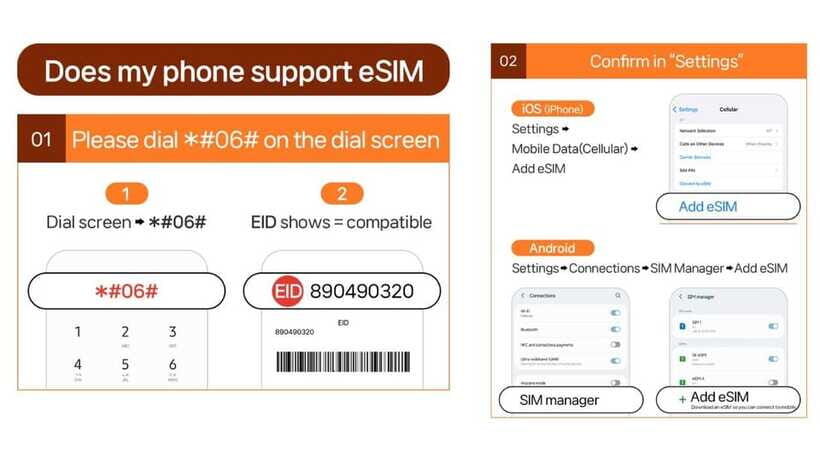
I’d book it if your priorities match the basics: dependable unlimited data, easy installation after the correct QR arrives, and optional voice/SMS only if you actually need a reachable Korean number.
Don’t book yet if you’re uncertain about eSIM compatibility. Do the EID check first. Also verify your phone is SIM-free with your current carrier, because that’s the kind of problem that can derail voice/SMS and delay everything.
If you do decide to buy, here’s my practical checklist:
- Make sure you’ll have the eSIM QR email when it arrives (don’t rely on the voucher QR).
- Install and connect after you land in Korea.
- If you want voice/SMS, plan the verification for after the 1-hour entry window, during 08:00–22:00.
- Keep LINK KOREA contact details handy (email and WhatsApp) in case your QR email or installation has an issue.
FAQ
FAQ
Is the data plan unlimited in South Korea?
Yes. It includes unlimited 4G LTE data without speed throttling.
What network does the eSIM use?
It runs on SK Telecom (SKT) in South Korea.
Do I get voice calls and SMS with the eSIM?
Voice calls and SMS are available after online verification. You’ll receive a Korean 010 phone number after that step.
Are outgoing calls and outgoing SMS included?
No. Outgoing calls and SMS are not included. Incoming calls and text messages are included without additional charges.
When does the eSIM start working?
The eSIM starts instantly when connected to SK Telecom’s network, based on the plan’s hour-based schedule, and it connects to the local network after you arrive in Korea.
How do I activate it in practice?
You’ll install the eSIM using the eSIM QR code delivered by email. The QR code on the voucher is not the eSIM QR code.
What if I get a QR code invalid error?
Check whether a new eSIM shows up on your phone under the SIM/eSIM settings (iOS: Settings > Cellular; Android: Settings > Connections > SIM Manager). If it still fails, contact LINK KOREA by email or WhatsApp.
Can I use the eSIM for hotspot sharing?
Yes. Hotspot sharing is supported.
Who is eligible to purchase this eSIM?
Only foreigners with an overseas passport can buy it. Korean passport holders cannot purchase.
How long can I use it?
Plans run from 2 to 90 days. If you stay 91 days or longer, service limitations may apply and refunds are not provided for that case.