REVIEW · SEOUL
South Korea eSIM (3-30 days. Up to 45GB)
Book on Viator →Operated by Xplori · Bookable on Viator
Staying online in Seoul is easier than you think. This South Korea eSIM is a simple, pre-trip way to get mobile data at local rates, with 4G/5G where available. You buy online, get the eSIM by email, scan a QR code, and you’re connected within minutes—no airport counters, no SIM swapping.
What I like most is the practical setup and the way the connection tends to behave once it’s active. You’ll also get the kind of coverage you care about for real plans: getting around Seoul, mapping transit, and staying in touch without hunting for Wi‑Fi. The main thing to watch is that it only works if your phone supports eSIM, and activation may take one quick device restart.
In This Review
- Key Things to Know Before You Buy
- How This South Korea eSIM Works (Email, QR, Data in Minutes)
- Price and Data Value: $5 for 3–30 Days and Up to 45GB
- Coverage and Speed: 4G/5G Now, 3G After Your High-Speed Cap
- Activation Tips for Seoul: Turn On Roaming, Then Restart if Needed
- Getting Around Faster: Why Mobile Data Beats Wi‑Fi in Seoul
- Remote Customer Service: What Help Looks Like
- Who This eSIM Suits Best (And Who Might Struggle)
- Your Booking Checklist (So You Don’t Get Stuck on Arrival Day)
- Should You Book This South Korea eSIM?
- FAQ
- How do I receive the eSIM?
- How do I activate the eSIM in South Korea?
- What phone models support this eSIM?
- How long can I use the eSIM?
- How much data do I get?
- Can I cancel for a full refund?
Key Things to Know Before You Buy
- Email delivery + QR activation means you can get connected fast after purchase
- 4G/5G where available, with speeds dropping to 3G after your high-speed data cap
- 3 to 30 days options, with plans totaling up to 45GB depending on the duration
- Remote customer service is available by email if you hit a snag
- Coverage expectations include reliable use from Seoul through Jeju Island based on reported experience
How This South Korea eSIM Works (Email, QR, Data in Minutes)
This experience is really about removing friction. Instead of buying a physical SIM in Seoul, you order the eSIM, then receive everything digitally through email. When you land, you’re not stuck in line or trying to explain your needs while holding your passport in one hand.
Activation is straightforward: you scan the QR code and activate the eSIM profile. The product info promises that you should be connected within minutes, and that matches what you want when you’re trying to confirm transit times, check your hotel address, or coordinate meet-ups.
Once activated, the eSIM is designed to handle mobile data automatically so you can use maps, translation, messaging, and streaming without constantly flipping between networks. It’s the kind of setup that keeps you focused on walking around, not troubleshooting.
Two important reality checks before you count on it:
- You need a phone that supports eSIM (more on that in the FAQ).
- You may need to restart your device to fully complete activation, especially on day one.
You can also read our reviews of more tours and experiences in Seoul.



Price and Data Value: $5 for 3–30 Days and Up to 45GB
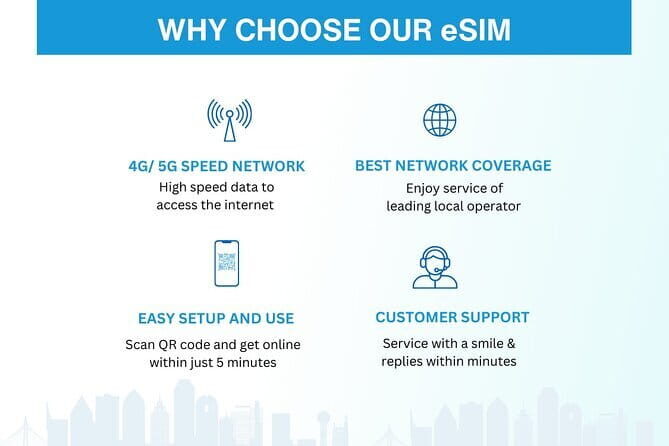
The price is listed at $5.00 per person, with durations from 3 to 30 days, and data totals up to 45GB depending on the plan you select. Even if you don’t use all the data, value comes from not having to deal with airport logistics and language barriers.
Here’s how to think about it for your trip:
- If you’re doing a short Seoul city break, a shorter plan can keep things simple. You’ll still have enough data for navigation, translation, and photos shared to friends back home.
- If you’re traveling longer, the 3–30 day range lets you match the eSIM lifespan to your itinerary. You don’t want your connectivity to expire halfway through a week of day trips.
- If you plan to stream more heavily (video calls, long streaming sessions), you’ll want enough total data to avoid hitting the high-speed cap too early.
The listing also frames this as cheaper than buying a SIM at the airport. That makes sense for two reasons: you avoid inflated airport pricing, and you avoid time costs. The time saved is real. Even a short delay can turn into a missed train, a rushed meal, or waiting around with tired feet.
One more detail to double-check: the description says the data plan covers all Canadian provinces. Since this is a South Korea eSIM product, I’d treat that as a potential copy/paste error and confirm what region your plan actually supports before you order. That’s the one thing I’d never assume.
Coverage and Speed: 4G/5G Now, 3G After Your High-Speed Cap
The big promise is connectivity powered by 4G/5G where available. That matters in South Korea because you’ll likely spend time in dense urban areas where fast data helps with navigation, rideshare-style routing, and video-based translation.
Just don’t plan on full speed forever. The terms explain that high-speed data is capped at the amount you select, and once you use it up, your speed switches to 3G.
What that means in real life:
- Even after you hit the cap, you should still have connectivity for everyday tasks like messaging, email checks, and map usage.
- Video calls and heavy streaming may feel slower once you’re on 3G.
- For longer stays, you might want to manage your highest-data activities (like downloading big files or streaming in high definition) until you’ve confirmed how quickly you’re using data.
One point that’s easy to overlook: the description emphasizes staying connected even after high-speed limits. That’s useful because it reduces the anxiety factor. You’re not suddenly cut off when you pass a number—you transition to slower speed, which is a more forgiving way to travel.
Activation Tips for Seoul: Turn On Roaming, Then Restart if Needed

Your phone setup is the difference between a smooth first day and a frustrating one. Here’s the approach I’d use so you don’t waste time when you land.
1) Make sure your phone supports eSIM before you buy
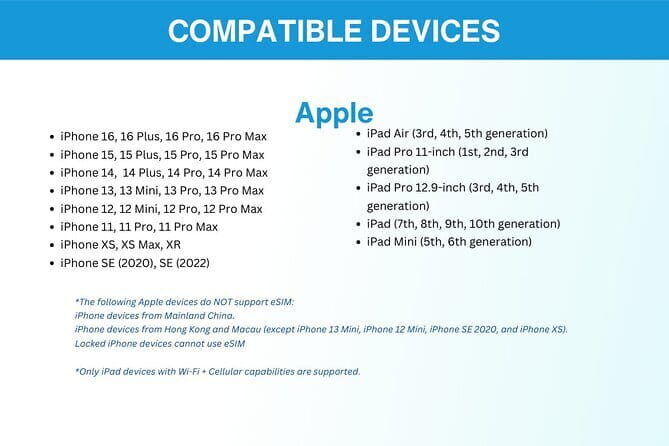
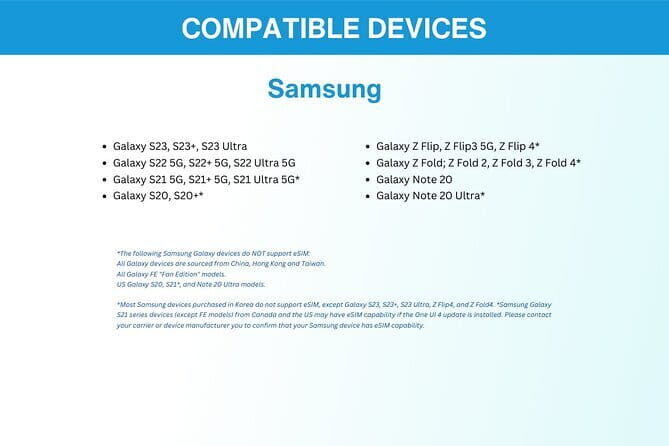
The product info gives specific supported models, including iPhone XS and later, Pixel 3 and later, and Samsung S20 / S21 / Fold.
2) Plan the activation timing
Activate the eSIM before you fully rely on it. If you’re arriving and immediately switching on data, you want to avoid doing it while you’re also trying to handle jet lag, baggage, and unfamiliar streets.
3) Expect one possible restart step
A practical tip from the experience details: you may need to restart your device to fully activate the eSIM. I’d do this proactively if activation feels partial—like if the profile is installed but data doesn’t seem to kick in.
4) Turn on data roaming when you land
One of the usage notes is that you need to turn on your data roaming after landing. This is normal for many travel SIM/eSIM setups, but it’s worth doing right away so your phone begins using the new profile.
If you follow that flow, you avoid the most common travel tech failure: everything is installed, but your phone isn’t actually using it yet.
Getting Around Faster: Why Mobile Data Beats Wi‑Fi in Seoul

Seoul is a city where Wi‑Fi can be spotty depending on where you are. With mobile data, you don’t need to hunt for open networks or ask for passwords. You can use your phone as your guide all day: station exits, restaurant locations, real-time transit info, and quick translation.
The value isn’t just convenience. It’s decision-making speed.
- You can check multiple options quickly (coffee nearby vs. one stop farther).
- You can confirm hours before you walk across a neighborhood.
- You can share your location with someone you’re meeting without running back to a hotel lobby.
When the connection is stable, your day feels lighter. Instead of planning around signal strength, you plan around what you want to do.
Also, if your trip includes more than just Seoul, you’ll appreciate the reported reliability beyond the capital area. The setup has been described as working well even on routes that include Jeju Island. If you’re thinking about mixing regions, having a single eSIM for the full trip is a clean way to avoid swapping plans mid-journey.






Remote Customer Service: What Help Looks Like
This product includes remote customer service via email. There’s no physical meetup, no pickup point—because it’s digital. That means support is about troubleshooting your setup, not guiding you around a city.
So what should you do if something goes wrong?
- Email support with the details you have: order confirmation, phone model, and what you see on your screen.
- Mention whether the eSIM profile is installed and whether you’ve enabled data roaming.
- If the connection doesn’t start, try the restart step referenced in the activation notes.
Because it’s remote, response time depends on the provider’s email handling, not on a local desk. Still, having support is valuable if your first attempt at activation doesn’t take.
Who This eSIM Suits Best (And Who Might Struggle)
This is a great fit if you:
- Want a simple setup with email delivery and QR activation
- Prefer not to deal with airport SIM purchases
- Rely on your phone for navigation and staying in touch
- Are traveling within a time window that matches a 3–30 day plan
It may be less ideal if:
- Your phone does not support eSIM
- You need a lot of data without wanting any speed reduction after a cap (because high-speed data switches to 3G once you pass the allowance)
- You’re arriving with limited time and don’t want to do a quick tech setup on day one—though the product is designed to make this quick
If your phone is compatible, you’ll likely find this approach low-stress. If it isn’t, no amount of good coverage matters.
Your Booking Checklist (So You Don’t Get Stuck on Arrival Day)
Before you order, I recommend you do a quick sanity check:
- Confirm your phone model is eSIM-capable (iPhone XS or later, Pixel 3 or later, Samsung S20/S21/Fold are explicitly listed).
- Decide how long you’re truly connected. If you’re out for 5 days, a 3-day plan may feel tight; if you’re out for 20 days, a shorter plan risks running out of high-speed data earlier than you want.
- Plan for the speed cap. If your trip includes lots of video calling or heavy streaming, you’ll burn high-speed data faster, then switch to 3G.
- Double-check coverage details—especially since the description text mentions Canadian provinces. For a South Korea eSIM, confirm exactly where your plan works so you’re not surprised.
Finally: keep your order email handy. You’ll need the eSIM info and QR code to activate.
Should You Book This South Korea eSIM?
I’d book it if you want the simplest possible way to stay connected in Seoul and you have an eSIM-compatible phone. The value is strong for the price: you’re paying a small amount to avoid airport hassle, language friction, and the time sink of figuring out a physical SIM after you land.
If you’re on a tight schedule, this kind of pre-arrival setup is exactly what helps. You’ll get data quickly and you’ll be able to navigate without constantly searching for Wi‑Fi.
I wouldn’t book it blindly if your phone doesn’t support eSIM or if you haven’t confirmed the region coverage details, especially given the odd Canada reference in the description. A quick confirmation now is cheaper than scrambling later.
If you can handle a fast activation and maybe one restart, this is a solid travel tool for modern South Korea trips.
FAQ
How do I receive the eSIM?
You get the eSIM delivered digitally by email after you order. It includes instructions and a QR code you’ll scan to activate the profile.
How do I activate the eSIM in South Korea?
Scan the QR code and activate the eSIM profile. The instructions say you should be connected within minutes, and you may need to restart your device to fully activate it.
What phone models support this eSIM?
The product info lists iPhone XS and later, Pixel 3 and later, and Samsung S20/ S21/ Fold as supported examples.
How long can I use the eSIM?
You can choose a plan duration from 3 to 30 days, depending on how long your trip is.
How much data do I get?
The plan provides data up to 45GB (depending on the option you select). High-speed data is capped, and after that your speed switches to 3G.
Can I cancel for a full refund?
Yes. You can cancel for a full refund if you cancel at least 24 hours in advance of the experience’s start time.